Page 1 of 2
best way how to start? (noob question)
Posted: Sun Jun 24, 2018 11:47 am
by netoper
hello.
i have taste to create new graphics and some new levels.
how is the best way to start? what i need? which editor for create custom graphics?
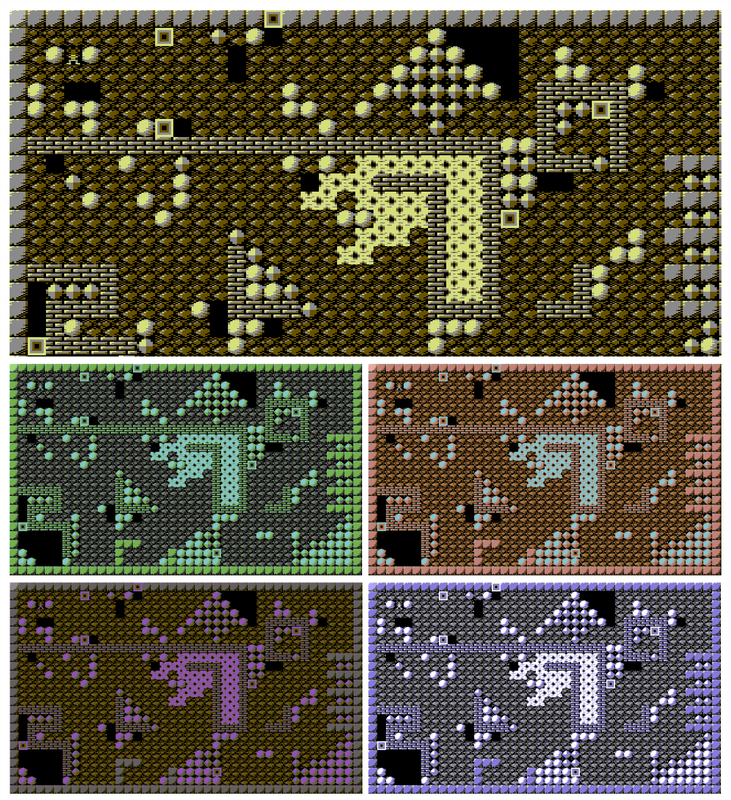
thanks.
Re: best way how to start? (noob question)
Posted: Sun Jun 24, 2018 12:37 pm
by Arno
netoper wrote:how is the best way to start? what i need? which editor for create custom graphics?
Welcome netoper!

I'd suggest you check out the Crazy Light tools:
http://www.gratissaugen.de/erbsen/plans.html
This is the most extensive tooling to create standalone Boulder Dash games for the C64, including custom graphics.
Posted: Sun Jun 24, 2018 2:00 pm
by netoper
thank you
yes i have this tool. very nice. good job.
but is here something which is without any modifications closest to original? i can not find these utility. i need original titles too. i do not need keys, bombs and any others titles which is not in original game.
Posted: Sun Jun 24, 2018 2:13 pm
by Arno
The Crazy Light Tools has everything that the original has. Including all original items. And a tool to change the graphics of the items.
Keys, bombs, all other items, settings and effects are "additional". You don't need to use those.
But perhaps you could try the original Construction Kit with Deluxe Packer. These tools only support the original items. And it includes an editor to change the item graphics.
It is available in
TOOLS.ZIP.
Posted: Sun Jun 24, 2018 5:05 pm
by LogicDeLuxe
Arno wrote:But perhaps you could try the original Construction Kit with Deluxe Packer. These tools only support the original items. And it includes an editor to change the item graphics.
It is available in
TOOLS.ZIP.
If you want a title screen close to the original, though, ie. with big letters. Deluxe Packer doesn't have them, but the Crazy Light Tools do.
If you only want classic elements, you can even configure the Crazy Light Construction Kit to only offer those and hide any advanced features.
Posted: Sun Jun 24, 2018 9:34 pm
by netoper
thank you all, but this is hard for me

i created my graphics, but i have no idea what to do next with that. its shame
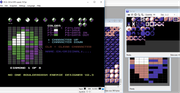
crazy light is fine, but he changes a lot of things in game. the upper score row is different.. is somewhere detailed instructions or video how can the whole process be done? custom graphics, custom charset, custom levels, title screen.. all from A to Z. most software from your disks @Arno in tools.zip are in german language and i do not know how i can/must use it.
Posted: Mon Jun 25, 2018 10:48 am
by LogicDeLuxe
On the Crazy Light Tools disk, run "preferences 3.0" or click on "configure editors" in the loader menu.
If it says "Sprache:de", click on it to change it to "Language:en", which should be already the case when you downloaded it from my homepage.
If you only want classic elements, you want to set "User skill:novice". Then click on "Save this setup". All editors should be English now.
Right after the download link on my homepage:
http://www.gratissaugen.de/erbsen/plans.html
There is a tutorial video on how to use the Construction Kit and create a standalone game afterwards.
For designing graphics for this engine, you need to use the Enemydesigner 3.0, which is also present on the Crazy Light Tools disk. The original No One version is not Crazy Light compatible. If the Crazy Light version is stuck with a cursor at the file name, it means that the file you tried to load is not compatible. Unfortunately, there is no graphics converter between these versions. If you want to do it manually, check out the RAM layout in my Dash FAQ:
http://www.gratissaugen.de/erbsen/BD-Inside-FAQ.html
In case you're using JiffyDOS, be aware that my directory routine does not work with it. My JiffyDOS mod for Dolphin DOS is also affected by this. This is something on my todo list. Eventhough it is JiffyDOS's fault, I intent to make my editors usable with it, as it became pretty much the de facto standard for c64 mass storage file transfer.
The status bar works pretty much the same as in earlier engines. Except you can give your cave name up to 14 chars, and some values got an extra digit for more flexibility.
If you want to use the older PLCK engine, you would probably use Deluxe Packer 1.51:
http://www.gratissaugen.de/erbsen/dlp151.zip
It is completely in English and has a manual (the English one is on the disk). You can use your graphics set and you can change your text char set, but you can't design a big title screen with big letters with it. You have always a top ten list on it and only a few lines to design your title on.
Posted: Mon Jun 25, 2018 12:02 pm
by netoper
thank for your time and exhaustive answer. i try your crazy light tool which looks really better. now i must redraw graphics
ouch. the animation speed is much fast.
2.3

3.0

Posted: Mon Jun 25, 2018 11:11 pm
by LogicDeLuxe
The animation speed in 3.0 was fixed to be previewed the way the game does it.
2.3 did not display it like in the game. It was quite a bit too slow.
Explosion sequences and blinking in/out boxes are the exception, as they are actually separate elements progressing with each cave scan and thus have no fixed animation speed.
Posted: Thu Jun 28, 2018 2:06 pm
by netoper
Posted: Thu Jun 28, 2018 8:32 pm
by Arno
I have to say, normally I stick to the original graphics, but yours are surprisingly nice!
I would prefer diamond animations 5 and 9 (numbered from left to right, from top to bottom). I like 6 too, but perhaps it has, like most of the others, too much flickering for the eyes.
Is the blinking round object a firefly? I liked the firefly in your first screenshots better!
Perhaps, if you create more than one game, you could vary your graphics, because I think your designs are really good!
Posted: Thu Jun 28, 2018 9:49 pm
by netoper
thank you
i'm glad you like it

yes, the flashing is the problem. in situation where is more diamonds on screen there is very strong flashing. it's also because of the speed of animation.
i understood. every boulder dash lover simply still prefers original graphics
your choice 5 & 9. hmm. is more closest to the original what i understand. my favourite is (adjusted) 10.

i just want to make the game little different, nicer, modern. preview here:
https://youtu.be/WsXJp50Zvd4
yes, the flashing circle object is firefly. but yes, you have true. i'm still working on it and still looking for best looking variations.
work name:
boulder dash - rebirth
EDIT:
modified firefly based on original:

Posted: Fri Jun 29, 2018 3:04 pm
by LogicDeLuxe
Those look really nice indeed. The objects are easy to distinguish, which is a very good thing.
Posted: Sat Jun 30, 2018 12:05 pm
by netoper
titanium wall improvement
amoeba improvement
and new rockford animations!

Posted: Sat Jun 30, 2018 6:12 pm
by CWS
For the last 3 decades I was always using the original graphics set but I have to admit that I like your set!
Only the walls should be without this dirty corner. Looking weird.